
Announcement Center
Beginner’s Guide: How Futures Trading Fees Are Calculated on BITGP

BITGP
2025-11-30 13:21


Understanding how futures trading fees work is essential for every trader—especially beginners aiming to manage costs and maximize returns. On BITGP, the fee structure is transparent, dynamic, and closely tied to your trading behavior and VIP level. This guide explains everything you need to know: maker vs. taker fees, how fees are calculated, how funding works, how your VIP level is determined, and how to review your actual fees on the platform.
1. Overview of Futures Trading Fees on BITGP
BITGP applies flexible and competitive fees based on:
-
The type of order (market or limit)
-
Whether the order is a maker or taker
-
Your current VIP level, which directly affects fee rates
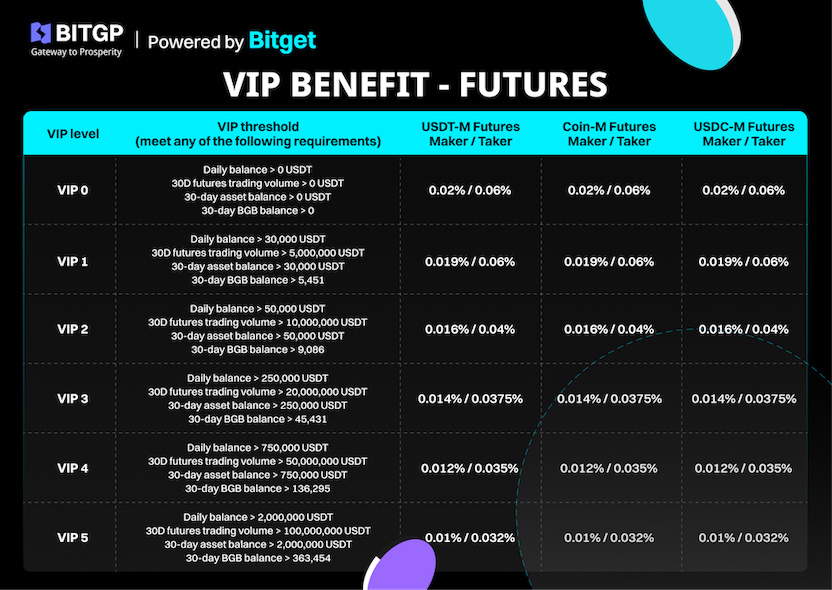
Your VIP level is determined by your spot trading volume, futures trading volume, total assets, and average BGB holdings over 30 days. The system automatically upgrades you to the highest VIP level you qualify for, even if different criteria place you in different tiers.
Example:
If you meet the requirements for VIP 2 Spot but only VIP 1 Futures, BITGP will still upgrade your account to VIP 2.
For the latest fee rates, refer to BITGP's official announcements:
2. Maker and Taker: What’s the Difference?
Every futures order on BITGP falls into one of two categories:
Maker — Provides Liquidity
A maker order adds liquidity to the order book because it does not fill immediately.
-
The order is placed at a specific price
-
It waits in the order book until another user matches it
-
Maker fees are lower because makers help the market stay liquid
Example:
Market price = 100 USDT
You place a buy order at 90 USDT → it does not execute immediately → you are a maker.
Taker — Takes Liquidity
A taker order fills instantly at the best available price.
-
Executes immediately against an existing order
-
Taker fees are higher because takers consume liquidity
Example:
Market price = 100 USDT
You place a buy order at 100 USDT → it executes instantly → you are a taker.
3. How BITGP Calculates Futures Trading Fees
Fees are charged when you open and close a position. The calculation depends on:
-
Entry or exit price
-
Position size (quantity × price)
-
Maker or taker fee rate according to your VIP level
Formula:
Trading Fee = Order Value × Fee Rate
Order Value = Contract Quantity × Price
Example:
-
Trader A places a market order (taker) to buy BTCUSDT:
Fee = 1 × 60,000 × 0.06% = 36 USDT -
Trader B places a limit order (maker) at 60,000 USDT:
Fee = 1 × 60,000 × 0.02% = 12 USDT
4. Understanding Funding Fees on BITGP
Funding is a mechanism unique to perpetual futures. It keeps the futures price aligned with the spot price by exchanging funding fees between long and short positions.
Important: BITGP does not collect funding fees.
Funding is exchanged only between traders.
Funding occurs 3 times daily:
-
06:00
-
14:00
-
22:00 (Vietnam Time)
You pay or receive funding only if you hold a position at these timestamps.
5. How BITGP Determines Your VIP Level
Your VIP level is calculated using several components recorded daily.
(1) 30-Day Total Trading Volume
-
Includes Spot, Futures, and On-chain volume
-
Excludes 0-fee trading pairs
-
Snapshot taken daily at 23:00 (VN Time)
VIP levels update automatically at 08:00 the next morning.
(2) Daily Asset Snapshot
BITGP captures total assets from:
-
Spot
-
USDT-M / USDC-M / Coin-M Futures
-
P2P
Snapshot time: 23:00 (VN Time)
All assets are converted to USDT based on real-time prices.
(3) 30-Day Average Assets
30-Day Average = (Total asset snapshots over 30 days) ÷ 30
(4) 30-Day Average BGB Holdings
Adjusted every two weeks using:
Average BGB Requirement = (30-Day Average Asset Value × 0.8) ÷ 14-Day Average BGB Price
VIP Upgrade & Protection Rules
-
You will always receive the highest VIP tier you qualify for.
-
When upgraded, you receive a 14-day downgrade protection period if asset fluctuations, not withdrawals or losses, cause the drop.
-
Protection cannot be triggered consecutively.
-
VIP level updates automatically at 08:00 daily.
New sub-accounts inherit the main account’s fee rates.
6. How to Check Your Futures Fees on BITGP
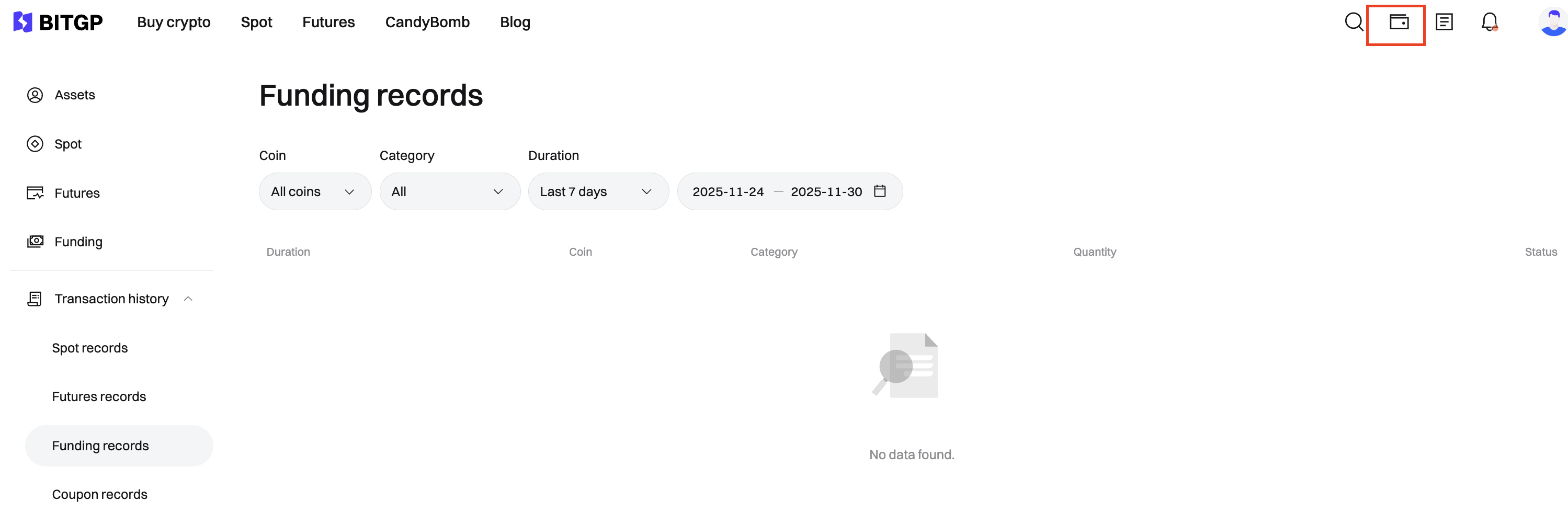
Method 1: Futures History
Go to:
Assets → Trade History → Futures History
You can see:
-
Entry/exit fees
-
Profit and loss
-
Fee breakdown for partial fills
BITGP may split orders into multiple parts, and fees reflect those portions.
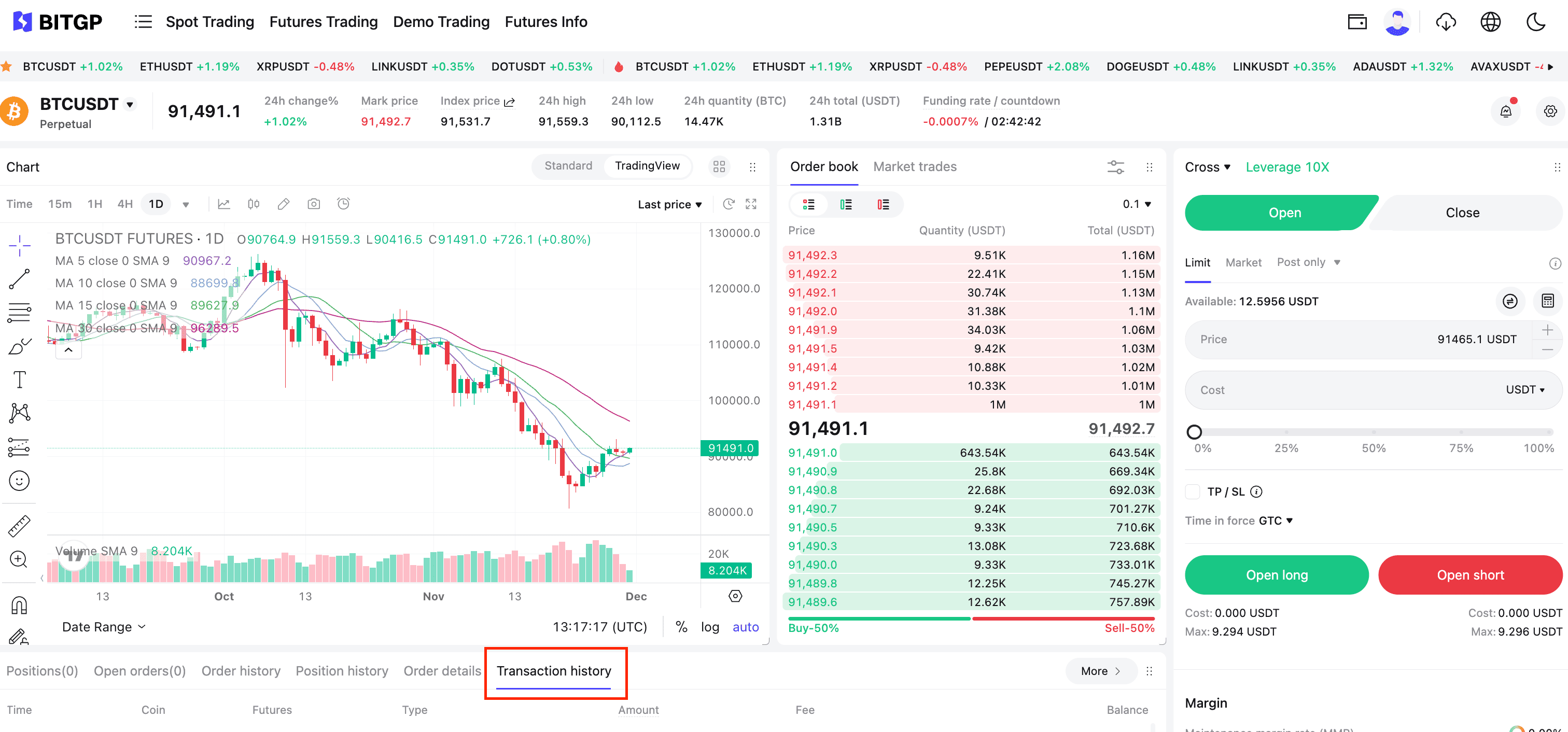
Method 2: Trade History on the Futures Trading Page
This view gives more granular detail:
-
Entry/exit prices
-
Quantity
-
Order value
-
Total fees
-
Each partial fill's fee component
Perfect for manual verification or auditing your trades.
Conclusion
Futures trading fees are a crucial factor that directly impacts profitability. By understanding the differences between maker and taker fees, how BITGP calculates trading and funding fees, and how VIP levels are determined, beginners can trade more confidently and cost-effectively.
BITGP provides a transparent fee system, competitive rates, and detailed reporting tools—ensuring traders at all levels can optimize costs, manage risk, and maximize performance.
Disclaimer
Cryptocurrencies are subject to high market risk and volatility despite high growth potential. Users are strongly advised to do their research as they invest at their own risk. Thank you for supporting BITGP!
BITGP is a trading platform within the Bitget ecosystem, focused on the Southeast Asian market including Vietnam. The exchange leverages Bitget’s infrastructure, liquidity, and User Protection Fund to deliver a secure and reliable trading experience for investors.
Ready to Start?
Register your BITGP account today and join Vietnam’s fastest-growing crypto community.
Follow us on Twitter and Telegram for campaign updates, airdrops, and industry insights.
🌐 Visit bitgp.com to learn more.